


- Exceptional 4K image quality day or night
- Ability to upgrade features as you go
- Gentle reminders to help you drive better
- Premium price may deter some buyers
- Requires hardwired installation for best experience
- No integrated display
Dashcams are on their way to becoming a regular fixture in most vehicles today. The breadth and depth of brands, features, and prices, especially on marketplaces like Amazon, have made them more available than ever. They give us peace of mind and provide a silent witness to insurers and law enforcement. Tesla’s Sentry Mode is a feature that has provided crucial evidence with notable mentions in the news.
Our reliance on these ‘silent witnesses‘ is increasing, and so are our demands of them. That’s why Thinkware, a Korean based company that has been servicing the dash camera community since 1997, is continuing to evolve with the needs of consumers. We have reviewed their cameras in the past, and the experience of using one is overall good, but we’re often wondering if HD is enough to pick up the details needed in case of an incident. The Thinkware U1000 is a 4K dash camera capable of providing reliable 4K 30P image quality and with it, increased resolution and better performance in mixed lighting conditions.
The prospect of having features such as the high 4K image quality and the ability to hard-wire into the vehicle for more advanced surveillance features is attractive. The Thinkware U1000 is also on the higher end of the price scale. The question is, do those features, and the extra effort of a hard-wired install, make it worth the cost and effort? As a stick-on camera consumer, I will attempt to answer that in the next few paragraphs.
Build Your Dash Camera Adventure


You can find the Thinkware U1000 in several different bundles, depending on the retailer. Some include a lighter adapter for those wishing to have a true 4K experience without professional installation, all the way to options that be hard-wired with a second 2K rear camera. There are even bundles with a radar module that prevents you from wasting battery life and storage. More on that later. The bundle we received includes the main Thinkware U1000 itself and can be hard-wired with an included kit. In this main kit, there is also a polarizing filter, which dramatically helps to cut down on reflections and glare experienced on some windshields, especially in the sun. I would recommend this bundle because, without the ability to hard-wire, you’re just buying a regular stick-on 4K camera in terms of basic functionality. If we’re going to spend the money, we want everything offered.

To check out all the signature features of the Thinkware U1000, we also received the optional 2K QHD rear camera and the radar module. That means that the U1000 supports dual-channel recording (front and rear). While the main camera supports up to 4K 30P (including 2K 60P if you want a smoother image), the rear camera is locked to a 2K 30P resolution. The front camera covers a 150 deg field of view, while the rear camera covers a 156 deg field of view, giving you reasonably impressive coverage for only two cameras. They feature Sony’s STARVIS sensors, which have known excellent low light performance, and you’ll find it in many high-end dashcams on the market.
The radar module itself unlocks a feature called Energy Saver 2.0. Unlike typical motion-based sensors, which can only switch on the camera after an impact has occurred, the radar module will detect motion and start the process of recording in advance up to 10 seconds. Once the event has passed, and there has been no impact, the camera goes back to sleep again. If there is an impact, the first 10 seconds before the crash, and the 10 seconds after, will be recorded. These files write to a separate folder on the memory card. Unlike constant recording setups, this doesn’t waste storage or your battery. The Thinkware U1000 needs to be hard-wired as these features are only available with continuous power from the accessory battery in your car.
The base-level Thinkware U1000 kit, which includes the front camera, 12V car adapter, windshield mount, clips, SD card and card reader, will run you $399 US. We recommend you spring for the kit with the hard-wire kit, circular polarizer, and the 2K rear camera for $499 US as it will give you the best experience. The optional radar module adds around $89 US. We also recommend that you pick up a 128GB high endurance card like a Sandisk, to replace the included 32GB card will be inadequate if you want more than just a few hours of recording. The constant recording and overwriting operations are very tough on memory cards, and you will want one that will be up to the task. Also, 128GB is the current largest size supported by Thinkware in the U1000, so you might as well go for the largest possible capacity, and record as much as possible in case it is needed.
Our kit, as tested, was roughly $588 US plus $29 US for the Sandisk 128GB High Endurance Card.
The Brains of the Operation – The Thinkware U1000

The front camera is where all the magic happens. It’s where you plug in the memory card, the radar as mentioned earlier and rear camera modules, and it’s what you want to mount first, so you can start getting the rest of the system setup. But it’s also perfectly capable as a single camera. You can start with it and then add on the other modules at a later date. However, we do recommend that you go for the dual-channel setup as it does include the hard-wire kit and the circular polarizer, including the rear 2K camera.
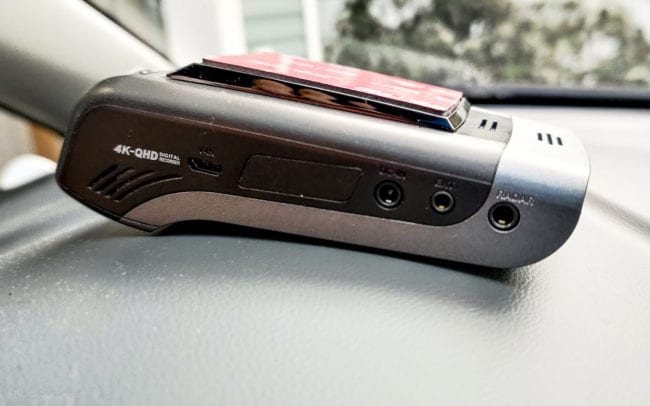
The left side of the unit, with the lens facing forward, is where everything plugin, so this is the busiest side. It supports the second camera, the power, whether it be hard-wired or from the 12V adapter, the optional GPS module, and the radar, as mentioned earlier module.

The right side features the speaker, microphone, reset switch, and where you would insert your memory card. Unfortunately, there are no Google or Alexa assistant features at this time. Flipping it on its back, with the adhesive mount facing down, we see the buttons. From the top-down, we have a power button, WiFi button, and a voice recording button, which does the ‘cone of silence’ in case you don’t want your conversation recorded for a while. The big record button is for those times you want to record something you need to r right now.

To the left and right of this button are the speakers which allow the unit to communicate what it’s doing as it has no screen. It will announce things like its current recording mode if it’s connected to the Internet, in a human-like voice. Pressing any of the buttons, as mentioned earlier, will also signal a verbal notification of the command you wish to perform. I guess, in a sense, this can be a less distracting way of operation as you aren’t taking your eyes off the road. But, if you have the radio going, you might miss the cues.
The speakers are also for the Advanced Driver Assistance System or ADAS. These include lane departure, forward collision, front vehicle departure, and red light camera alerts (where available). The U1000 will chime with different sounds in each case, alerting you to what is happening more subtly, instead of with the voice, which could prove annoying over time. These sounds seem to find a way to penetrate cabin sounds, including the stereo, which is impressive in itself. It does require familiarizing yourself with what they all mean, though, to maximize their helpfulness.
Let’s talk about the install process and some shortcuts that may be helpful.
Install it Yourself, With a Friend, or Get a Pro.
Installing this system was something I wanted to do myself from beginning to end. Just so you don’t think I’m some sort of crazy electrical engineer, I’m not. But I can build a PC very quickly. I don’t consider myself a professional, but I’m on the intermediate side. I believe that people can surprise themselves, but a friend who has some experience is never a bad person to have along with you on these sorts of installation adventures. Here are some highlights that might help you with your install.

Cable management will likely be your most challenging hurdle as you’ll have to pop open panels, manage plastic clips, and generally, be willing to get dirty. The rear camera will be the most difficult to install due to its location in the back of the vehicle. The radar module install is relatively easy if you have the kit that includes it. You just stick it to the opposite side of the dashcam, and plug it in, tucking the cable over the headliner.

One note I will mention about the rear camera installation, that you will want to keep in mind, is that you’ll not only want the camera centred, but you do want to put it in a place where the rear windshield wiper if you have one, can keep the glass clean. If you don’t have a rear wiper, you’ll just want to keep the glass clean. Also, make sure that you don’t stick it to one of the rear defroster lines, as this will likely cause the adhesive to fail over time.
The install in a 2017 Chevrolet BOLT EV went along with the help of extremely long cable ties and flexible fingers. But I got a little nervous when it looked like I had to mess with the fuse box and slice into cables on my Chevy Bolt EV. I didn’t want to do that. Because I own an EV, that presented yet another issue as most plug and play harness solutions like the Thinkware supported plug and play kit was not a viable option either because it didn’t’ support EVs and their unique power requirements.

Luckily, I was able to find a completely Thinkware compatible adapter from a company called iRoad, a competitor to Thinkware on their domestic Korean soil. The iRoad JW-200 is an OBDII adapter that can use the port to power a Thinkware (or iRoad) dash camera, allowing the continuously powered functions, like parking recording, to function correctly. Most importantly, iRoad had two models available, and the JW-200 made for EVs and their unique power requirements, so it won’t kill the battery when parking mode functions are enabled. If you don’t have an EV or a PHEV, then the standard JW-100 model is the one you want. This item simplified the install, and all I needed to do was route power from the U1000 unit, down the A-pillar, to the OBDII port. If you don’t have this constraint, the Thinkware endorsed harness made by EchoMaster is available on their website. I’m a fan of these types of quick-connect solutions because it all reverses easily, and they have support in case there is an issue.
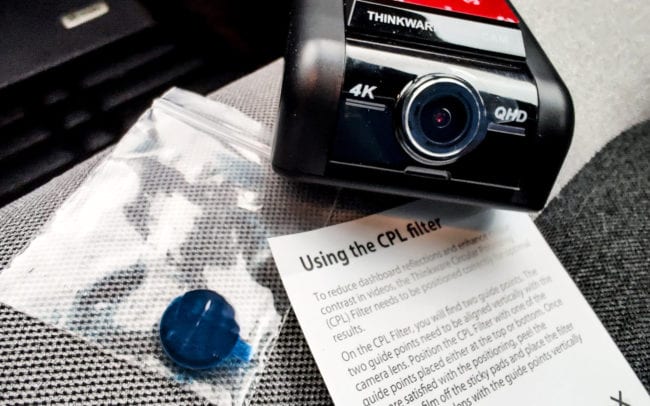
Before sticking the front camera onto your windshield, you’ll want to install the circular polarizer. This little accessory (optional in some kits) lets the lense see right through the glare in glass, similar to how a circular polarizer does on a camera lens when it shoots very reflective surfaces. The polarizer is easy to install if you keep the orientation correct as marked. Just follow the instructions carefully before you peel and stick it to the lense. Do it in a place that isn’t dusty as once you install the polarizer, it’ll be challenging to get the dust out of the tight seal t between it and the lens on the dashcam.

Without going into a whole lot of extra details, the next step is to install the Thinkware app (available on Android and iOS), which will allow you to register the camera and tweak the settings. I recommend enabling Low Energy Mode 2.0 (if you have the radar module), turning up the resolution on the camera to 4K 30P, and flipping the rear camera upside down. Why? I found out that the camera was recording upside down based on the way I installed it, so if you purchased the U1000 with it, you’d want to set this to the correct orientation. Make sure you’ve inserted the 32GB memory card it comes with, or even better, a larger one, like the aforementioned 128GB Sandisk High Endurance. You’ll need the extra storage for the 4K footage, and especially if you have the rear channel recording simultaneously as well. In my experience with it, over a couple of weeks, I was only able to get about 1 or 2 days or recording with the 128GB card. The included memory card (32GB) would be woefully inadequate if you want to record a full workday and your commute back home.
As you can probably tell, this isn’t a ‘stick and forget’ type of installation. If you don’t like fishing cables or crawling around your cabin, you will probably want to talk to a car stereo shop or installer to help you with this. But if you have ever installed a car stereo, or have built a computer, this should be a piece of cake. It’s definitely on the more advanced side of the installation scale. Still, it does give you an installation that not only lets you take advantage of all the features, but it also looks more integrated with your vehicle. Since it’s wired into your battery, you don’t have to wonder if it’s powered up and ready to go.
Now that it’s all installed let’s go for a drive!
Driving Around Town and Parking

I was delighted with how the installation itself turned out with the Thinkware U1000 system. The entire system, front and back, looked like it belonged there. You wouldn’t notice the rear camera unless you were tailgating. And as soon as someone realized that the camera was running, their behaviour changed. They even let you in at a merge. The recording light can be disabled for front or rear cameras if you want more of a sneak attack, but I feel that having it on the rear camera is a bit of a safety/warning feature. The U1000 central unit was ready to pounce, hidden behind the rearview mirror.
We spoke about the advanced driver assistance features or ADAS that include lane departure, forward collision, front vehicle departure. Rather than taking control of the vehicle by braking for you or taking the wheel, It gives you gentle beeps, noises, and chimes. Once you know what these are, they can be useful to warn you of an issue on the road. There is a bit of leeway to tune their sensitivity and frequency within the app, preventing them from being too annoying and potentially ignored or turned off completely. I set mine up to be least sensitive so that I know that if they have to come on, I should do something. Now, when a car has done an emergency stop, I know for sure because that’s when it kicks in, and I have a few more seconds to prevent running into them. I feel the front vehicle departure is a function that only exists because people are still looking at their phones when they shouldn’t. It tells you when the vehicle in front starts to move. Lane departure was probably the most varied in terms of performance as it did try to use the lines in the road for guidance. When it snows in Canada, what lines?
As for parking warnings, you’ll have to play with the varying levels of sensitivity. I can tell you that setting it to the highest sensitivity isn’t a great way to conserve storage or get useful footage. The radar module is excellent because it only activates the camera when something is approaching that is worth the U1000s attention. Switching between the low energy mode, which takes advantage of the radar module, I was finding way fewer clips in the folder that were a waste of my time. With the help of the radar module and a hard-wire installation, the camera will pre-record the first 10 seconds before and after impact.
In contrast, non-radar modes only trigger the camera to record after something has happened. Rather than a he-said/she-said situation, you’ve caught everything leading up to the parking incident. Keep in mind; the radar module only works when it is front-facing, so you’ll need to back into your spots, which, in itself, is also safer, as you can see what’s in front of you when you pull out of a spot.
Verbal cues for when the camera has entered parking mode (when you’ve not moved in some time, like in heavy traffic) and when you re-enter the vehicle after parking it, to let you know there are clips to review, are all helpful, and make the U1000 system a little more interactive. You’re less likely to forget to review the video clips if you do it right when you get in the car.
The Power of the Cloud or a Puff or Smoke?
Select Thinkware dashcams, including the U1000, have access to something called Thinkware Cloud, which sets up within the app. It features remote monitoring if there is an active Internet connection present. This feature was not as useful as it seems because it relies on an active Internet connection. Usually, one that leaves with me when I leave the car because my smartphone never leaves my side. Since my Chevy Bolt EV does (did) have a data plan, I also know that the active connection shuts off when I turn off the vehicle. That means that all this monitoring, like the parking incident notifications, or the vehicle location tracking, is pretty much useless. If Thinkware was somehow able to integrate a cellular modem into the camera, this might give me a different impression. But, nonetheless. I gave it 30 minutes, and that’s all the attention I’ll give it. If Thinkware makes their cloud service more practical, I’d be happy to revisit.
Video Quality – Day Time
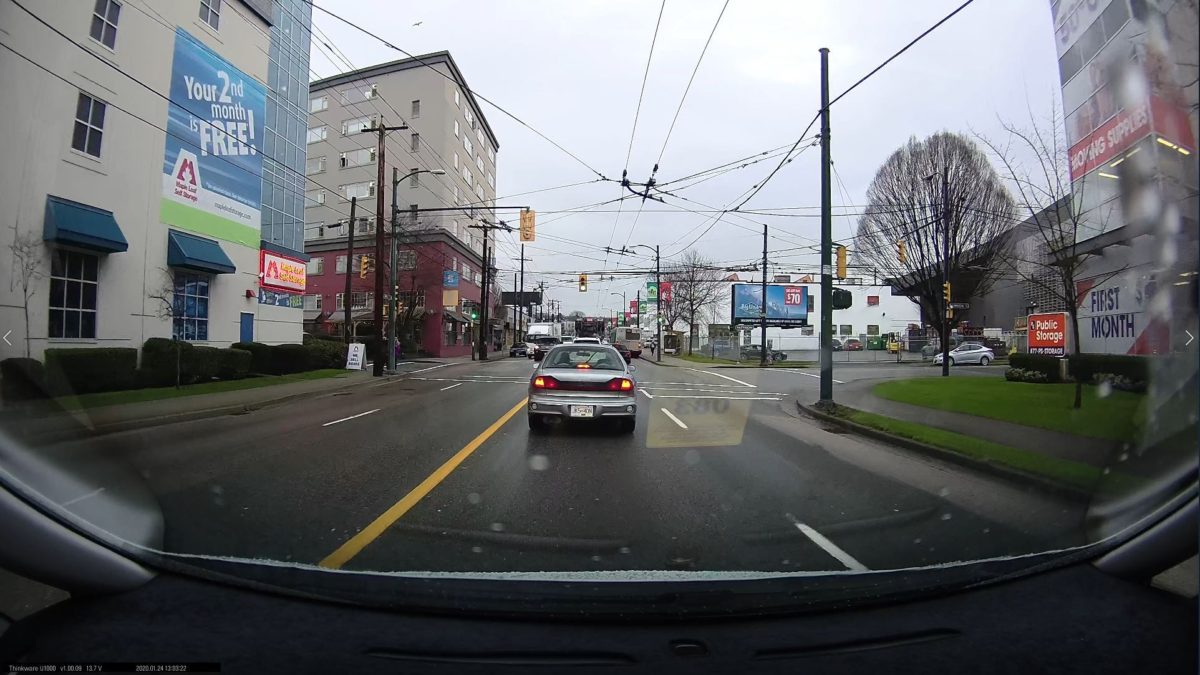
The overall video quality of the front 4K camera was similar to what you might get in a GoPro. The wide 150 degrees gave a nice broad view of the road ahead, but with the usual distortion of such a broad view. In ideal lighting conditions, the image was clear, allowing you to spot license plates reasonably easily. That’s par for the course for any modern camera, but there is a very noticeable sharpness, clarity and contrast in the image that less expensive cameras cannot achieve. The extra pixels are worth it, allowing you to punch into details.
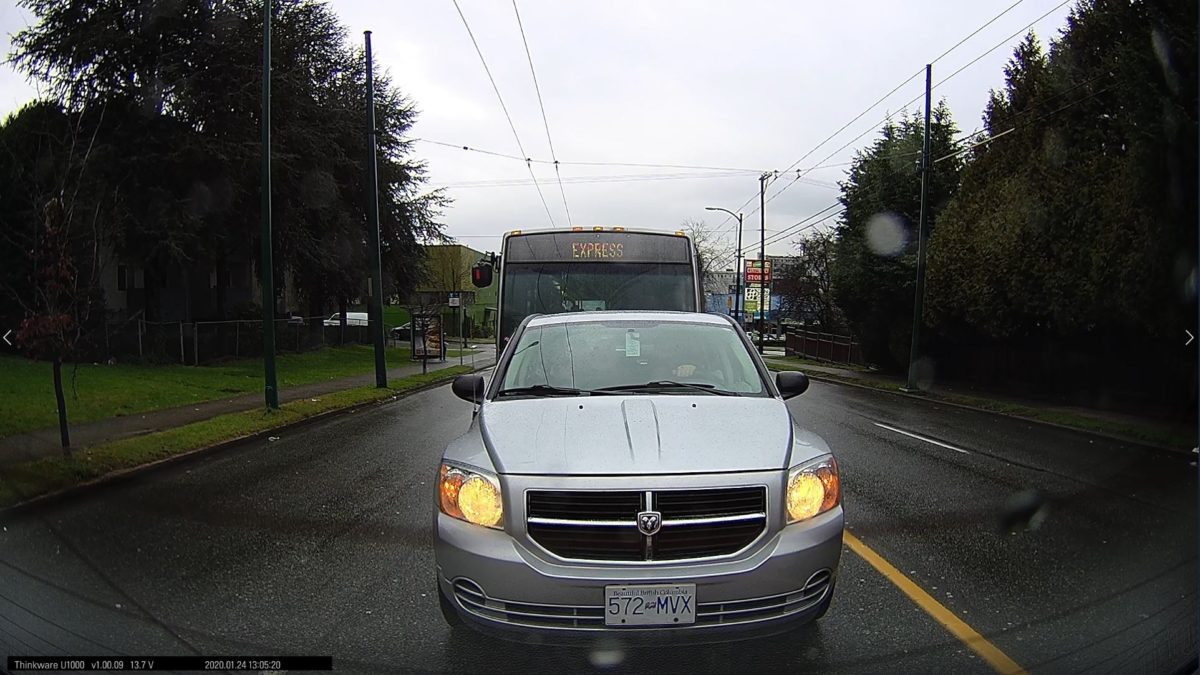
The rear camera, even though it is only a 2K unit, provides a good picture, but not nearly as sharp as the 4K image of the front camera, of course. The broad 156-degree view gives good coverage to both lanes behind you, as well as a decent view of the street beside you. As noted, having your rear windshield covered in grime won’t be very helpful, so it’s essential to keep the glass clean. RainX should help the water bead easier if you don’t have a rear wiper. On both cameras, motion blur wasn’t much of an issue in well-lit conditions.
Video Quality – Night-Time
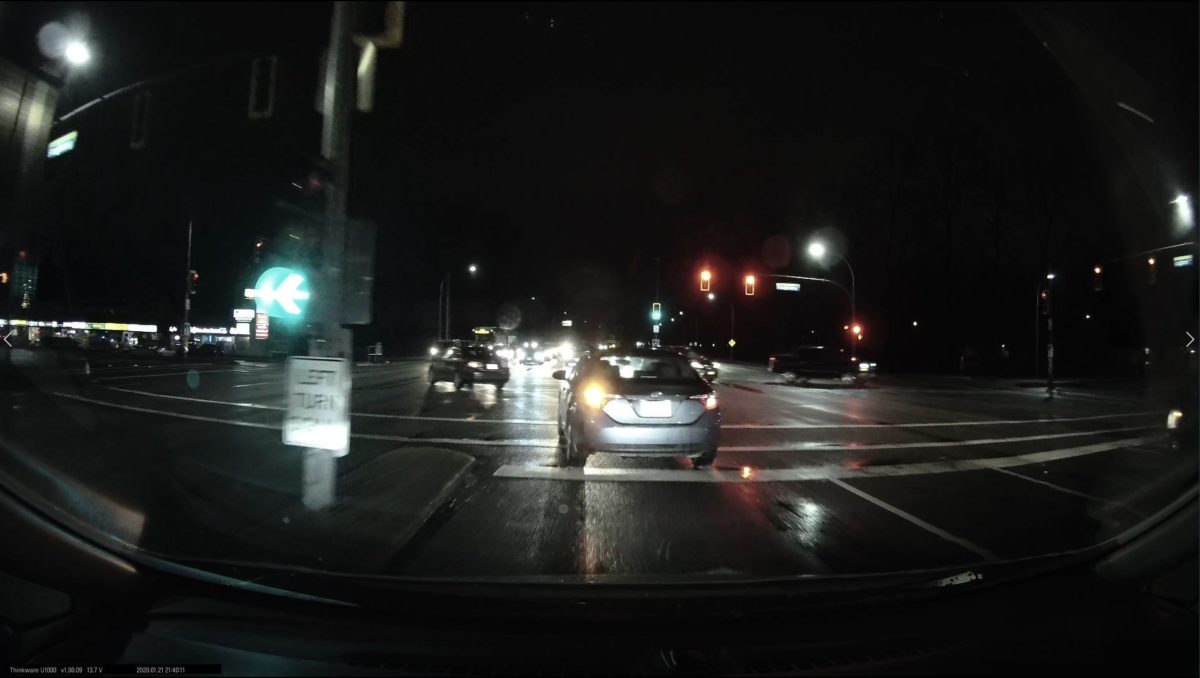
Where we did start to run into issues was during night time driving, especially in inclement weather. Low light conditions are very challenging for all cameras as the glare of the headlights can blow out the license plate number until they are just far enough away. Then the challenge is trying to read it. It’s a lot easier with a 4K image to resolve the picture, however, and that’s where the U1000 redeems itself.
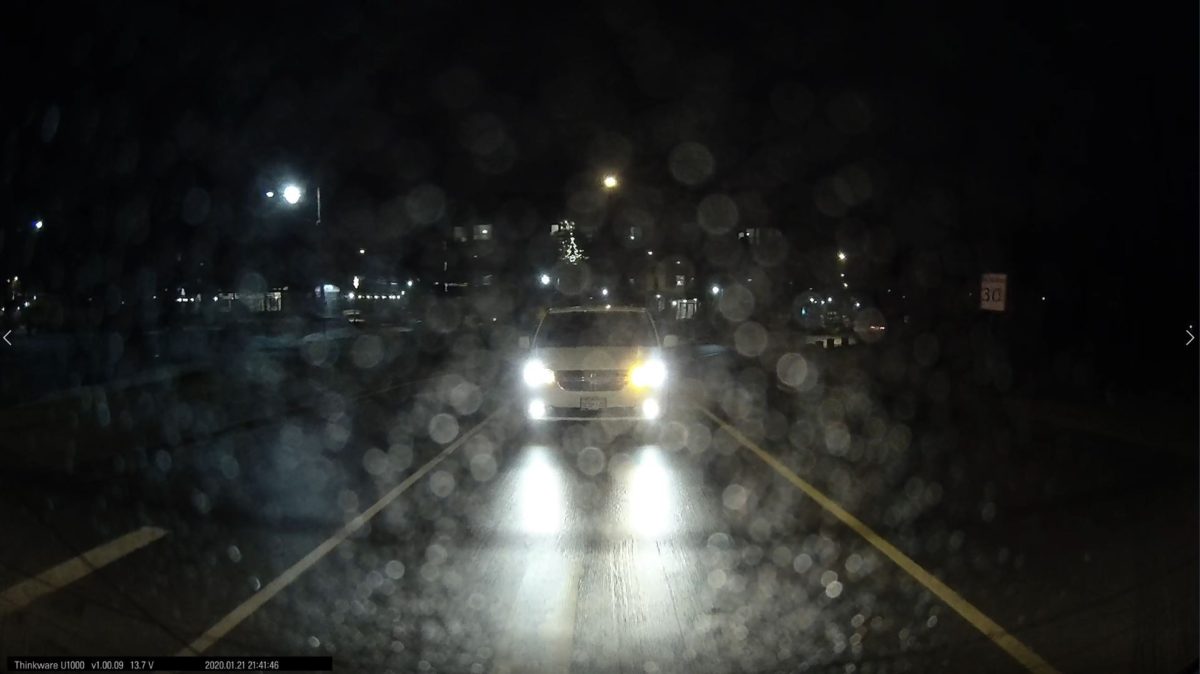
The rear camera, having fewer pixels at 2K, ended up with similar shortfalls in the darkness, compounded by the grime on the back window. The higher frame rate (60p) did seem ever so slightly less bothered by motion blur as opposed to the 30p of the front 4K camera. The bottom line is whether the footage is usable, and I would have to say it’s one of those better than nothing situations. However, in dark parkades and parking lots where nothing is moving, the image quality is usable, you can see license plates clearly, and with the radar module scanning, you should be happy with what you get, should you ever need it. But do keep your windows clean. A quick wipe when you leave your vehicle never hurts.
One other thing you should be aware of is, if you do buy this system, you should replace the 32GB card with a 128GB one. With two cameras going, with a daily commute of around 90 minutes round trip, with the camera helping you log all the shenanigans around your car during the day, you’ll get maybe a day and a bit out of a 128GB card. While Thinkware only supports up to a 128GB card at the moment, I have tested the U1000 with a 256GB Sandisk Endurance card, and it’s been solid for quite some time. You get at least a couple of days of recording in the real world.
Is the Thinkware U1000 Worth Buying?

Investing in a decent dash-camera system seems to be something where you shouldn’t be ‘half-pregnant.’ If you’re going to go to the trouble to hard-wire in a dual-camera system like the Thinkware U1000, you should install it fully equipped. I honestly can’t see anyone happy with paying for a system like this, only to use half the features. Get the radar module, get the rear camera, get the circular polarizer, and do yourself a favour, and for sure, get at least a 128GB memory card. Especially if you have a 90 min+ commute like I do. I still needed a 256GB card, though for that extra peace of mind, should I forget to retrieve important footage the next day, and it would be great if Thinkware could certify for larger than 128GB. I have been using the larger card for science but be aware of the unofficial nature of my use. Once it’s all installed, you’ll likely never touch it again, and that’s a good thing. It’s that silent witness you need when it’s essential. The radar module contributes significantly to this, saving space on the card and recording only when needed and giving you that extra 10 seconds before and after for additional assurance that you ‘got the shot.’
Speaking of footage, I found the video quality to be very decent in more ideal circumstances, namely with good light and less inclement weather, overall. Low light will always be a challenge for any camera with small sensors, but the Sony sensors that Thinkware chose, I thought, did a pretty Ok job. It’s certainly way better than any of the HD and 2K dashcams I’ve owned in the past, and nearly on par with action cameras like a GoPro. The extra pixels give you additional flexibility should the need arise, and the wide 150 degrees (front) and 156 degrees (rear) coverage respectively leave very little out.
Things I was not as enthusiastic about were the advanced driver assistance features (ADAS), and I was not impressed with the Thinkware Cloud (BETA). Thankfully, the Cloud functions are still BETA, so I can’t hold that against them as it would classify as a non-supported extra. I didn’t hate the ADAS either, but I do wish there was some way to make it integrate better into your driving experience. In most cases, it was merely not noticeable, and I would have preferred a voice, instead of having to memorize a series of beeps and chimes, and what they mean.
The Thinkware U1000 system, as tested, is a $588 US investment. Add another $29 or $60 for a 128GB or 256GB (unsupported) memory card, and you’re looking at more. If you’re getting it installed, expect to pay even more. But, if you ever get into an accident, or a hit and run, or a parking disagreement, I think that the stress it removes, and the money you may save from avoiding deductibles, make it worth it. And when the world returns to normal, and it’s time to get out on the open road again, it’s a great way to document your trips without having to find a place for your GoPro. It’s just there as a silent witness, and it’s ready, and it’s ready to go. If you can afford it, definitely get one installed in your car.